Working with the Public ICCUB Catalog and Waveform Integration
This tutorial demonstrates how to work with waveforms from the public ICCUB (Institute of Cosmos Sciences) numerical relativity catalog, hosted at egrav.icc.ub.edu, and how to perform waveform integration from Ψ₄ (Weyl scalar) to strain h.
ICCUB simulations provide Ψ₄ data, which needs to be integrated twice to obtain the gravitational wave strain. PyART provides tools for this integration, and also stores a pre-computed strain in the downloaded file that we can use as a reference.
Setup
%matplotlib inline
%config InlineBackend.figure_format = 'retina'

import matplotlib.pyplot as plt
import numpy as np
from PyART.catalogs.icc_public import Waveform_ICC
from PyART.analysis.integrate_wave import IntegrateMultipole
Load ICCUB Waveform
Waveform_ICC downloads the simulation from the public catalog the first time it’s requested (download=True), and reuses the cached files under path afterwards. ellmax is capped at the highest multipole the public release provides (l<=4).
# Public ICCUB catalog entry to use
path = './local_data/icc/'
ID = 1

icc = Waveform_ICC(path=path, ID=ID, download=True, ellmax=4)
icc.load_psi4lm()  # psi4 modes are not loaded automatically

print("Waveform loaded successfully!")
Waveform loaded successfully!
Display Metadata
Let’s examine the simulation parameters:
print("Simulation Metadata:")
print('=' * 60)
for k, v in icc.metadata.items():
    print(f'{k:20s} : {v}')
print('=' * 60)
Simulation Metadata:
============================================================
name                 : 0001
m1                   : 0.5000000000205165
m2                   : 0.5000000000205164
M                    : 0.9951479762112182
q                    : 1.0000000000000002
nu                   : 0.25000000000000006
chi1x                : 0.0
chi1y                : 0.0
chi1z                : 0.125
chi2x                : 0.0
chi2y                : 0.0
chi2z                : 0.125
S1                   : [0.      0.      0.03125]
S2                   : [0.      0.      0.03125]
e0                   : 0.7918881219932952
Mf                   : 0.939200833209028
J_f                  : 0.76471894615642
pos1                 : [ 0.  0. 20.]
pos2                 : [  0.   0. -20.]
============================================================
Visualize the Waveform
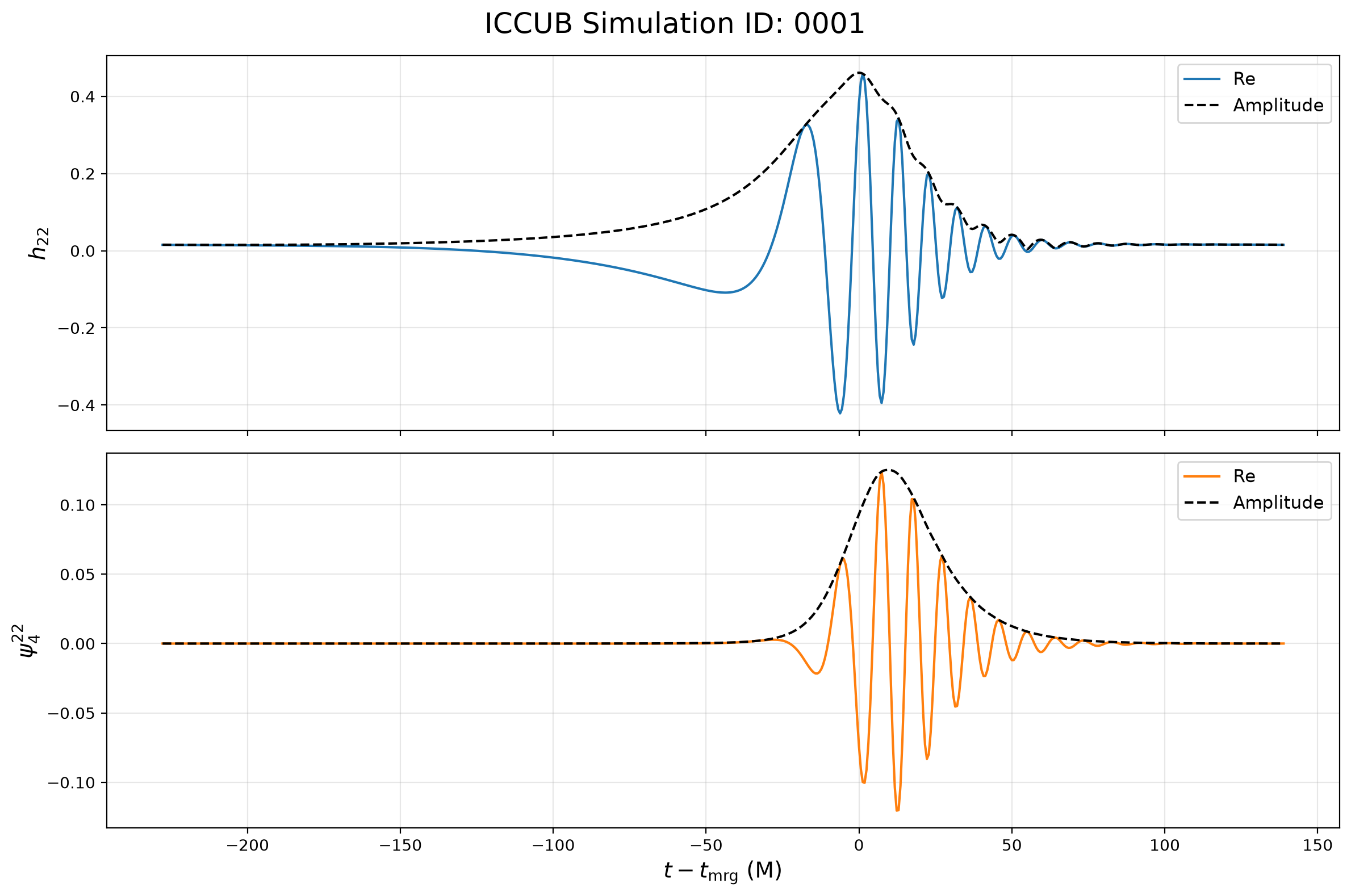
Plot the (2,2) strain and Ψ₄ modes stored in the catalog:
# Merger time from the stored strain
tmrg, _, _, _ = icc.find_max(kind='global')

fig, axes = plt.subplots(2, 1, figsize=(12, 8), sharex=True)

axes[0].plot(icc.u - tmrg, icc.hlm[(2, 2)]['real'], label='Re', linewidth=1.5)
axes[0].plot(icc.u - tmrg, icc.hlm[(2, 2)]['A'], label='Amplitude', linewidth=1.5, c='k', ls='--')
axes[0].set_ylabel(r'$h_{22}$', fontsize=14)
axes[0].legend(fontsize=11)
axes[0].grid(True, alpha=0.3)

axes[1].plot(icc.u - tmrg, icc.psi4lm[(2, 2)]['real'], label='Re', linewidth=1.5, c='C1')
axes[1].plot(icc.u - tmrg, icc.psi4lm[(2, 2)]['A'], label='Amplitude', linewidth=1.5, c='k', ls='--')
axes[1].set_ylabel(r'$\psi_4^{22}$', fontsize=14)
axes[1].set_xlabel(r'$t-t_{\rm mrg}$ (M)', fontsize=14)
axes[1].legend(fontsize=11)
axes[1].grid(True, alpha=0.3)

fig.suptitle(f'ICCUB Simulation ID: {ID:04d}', fontsize=18)
plt.tight_layout()
plt.show()
Testing the Integration Method
The catalog also provides the raw Ψ₄ multipoles, so we can run PyART’s IntegrateMultipole (fixed-frequency integration) ourselves and inspect its outputs:
# Get Psi4 data
t = icc.t_psi4
psi4 = icc.psi4lm[(2, 2)]['z']
l, m = 2, 2

integr_opts = {
    'f0': 0.002,
    'extrap_psi4': False,  # the catalog data is already extrapolated to r=infinity
    'method': 'FFI',
    'window': [20, -20],
}

# Run the integration explicitly
mode = IntegrateMultipole(
    l, m, t, psi4,
    **integr_opts,
    mass=icc.metadata['M'],
    radius=1.0,
    integrand='psi4'
)

# Plot the integrated quantities
plt.figure(figsize=(14, 10))

plt.subplot(3, 1, 1)
plt.plot(t, mode.h.real, c='b', linewidth=2, label='Integrated')
plt.plot(t, icc.hlm[(2, 2)]['real'], label='Original', linewidth=1.5, color='r', linestyle='--')
plt.ylabel(r'Re[$h_{22}$]', fontsize=14)
plt.grid(True, alpha=0.3)
plt.title('Strain', fontsize=14)
plt.legend()

plt.subplot(3, 1, 2)
plt.plot(t, mode.dh.real, c='b', linewidth=2)
plt.ylabel(r'Re[$\dot{h}_{22}$]', fontsize=14)
plt.grid(True, alpha=0.3)
plt.title('Strain Derivative', fontsize=14)

plt.subplot(3, 1, 3)
plt.plot(t, mode.psi4.real, c='b', linewidth=2, label='Integrated')
plt.plot(t, icc.psi4lm[(2, 2)]['real'], c='r', linewidth=1.5, linestyle='--', label='Original')
plt.xlabel('Time (M)', fontsize=14)
plt.ylabel(r'Re[$\psi_4^{22}$]', fontsize=14)
plt.grid(True, alpha=0.3)
plt.title('Weyl Scalar', fontsize=14)
plt.legend()

plt.tight_layout()
plt.show()
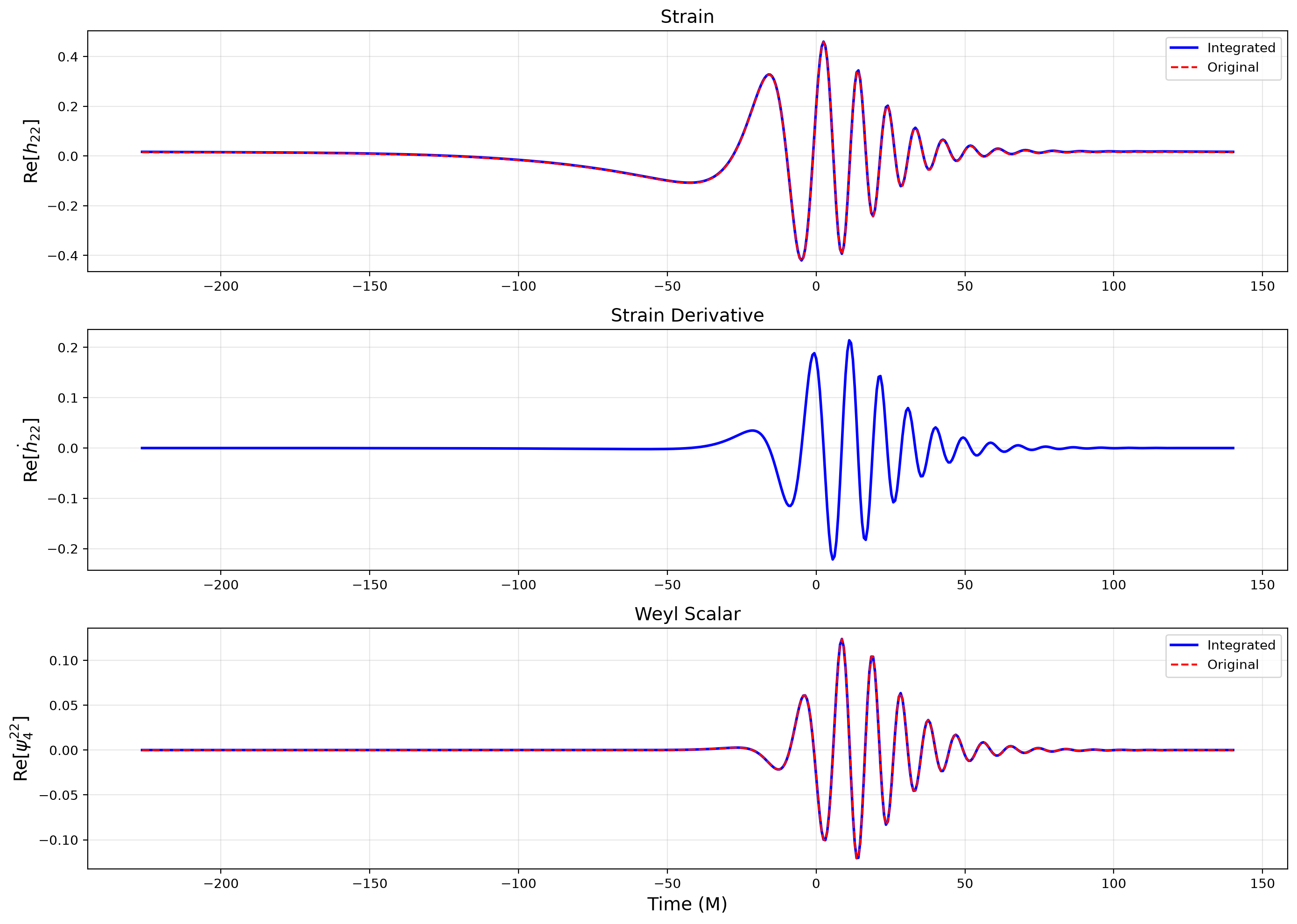
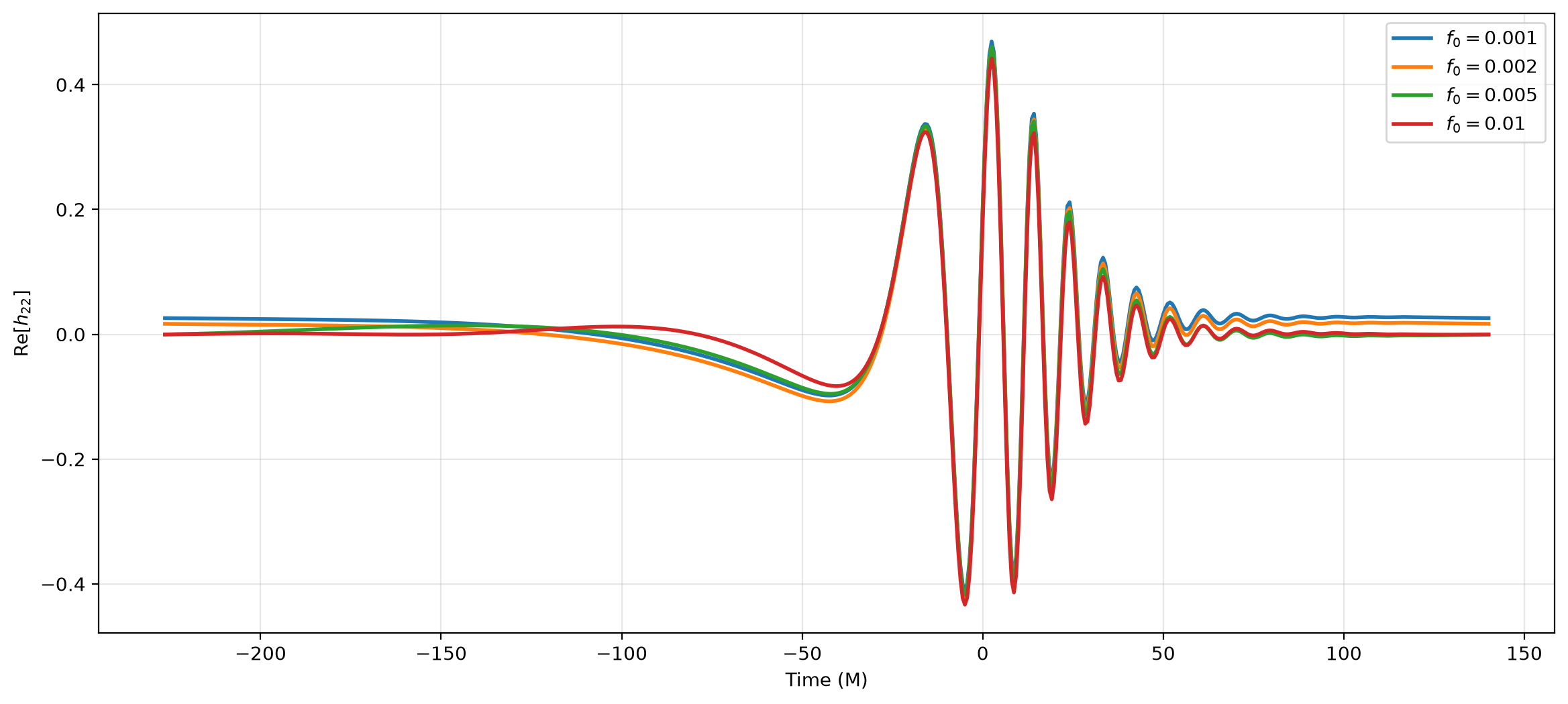
The choice of \(f_0\) in the integration options determines the low-frequency cutoff for the waveform integration. A smaller value of \(f_0\) allows for more accurate integration of the low-frequency components, but may also introduce numerical noise. For instance, the real part of the integrated strain does not exactly taper to zero after merger. Choosing a slightly larger value of \(f_0\) can help mitigate this issue by suppressing the low-frequency noise
# Get Psi4 data
t = icc.t_psi4
psi4 = icc.psi4lm[(2, 2)]['z']
l, m = 2, 2

# Plot the integrated quantities
fig, ax = plt.subplots(figsize=(14, 6))
for i, f0 in enumerate([0.001, 0.002, 0.005, 0.01]):
    integr_opts['f0'] = f0

    # Run the integration explicitly
    mode = IntegrateMultipole(
        l, m, t, psi4,
        **integr_opts,
        mass=icc.metadata['M'],
        radius=1.0,
        integrand='psi4'
    )

    ax.plot(t, mode.h.real, linewidth=2, label=rf'$f_0={f0}$')
ax.set_xlabel('Time (M)')
ax.set_ylabel(r'Re[$h_{22}$]')
ax.grid(True, alpha=0.3)
ax.legend()

plt.show()
Summary
This tutorial demonstrated:
Downloading waveforms from the public ICCUB catalog
Integrating Ψ₄ (Weyl scalar) to obtain gravitational wave strain
Comparing the stored strain with the raw Ψ₄ data
Running PyART’s integration tools explicitly
Key Points
The public ICCUB release currently provides multipoles up to
l=4The Fixed Frequency Integration (FFI) method provides accurate strain from Ψ₄
Integration requires careful choices of f₀ (low-frequency cutoff) and time windows
PyART’s integration tools handle extrapolation and windowing automatically
Next Steps
Explore different integration methods and parameters
Compare ICCUB waveforms with other catalogs
Perform mismatch calculations with EOB models